DropdownField
The DropdownField component is a control that allows users to select a single option from a dropdown list.
Usage
DropdownField is included in the UraniumUI.Material.Controls namespace. You should add it to your XAML like this:
xmlns:material="http://schemas.enisn-projects.io/dotnet/maui/uraniumui/material"
Then you can use it like this:
<material:DropdownField Title="Pick an option" ItemsSource="{Binding Items}" />
| Light (Android) | Dark (Windows) |
|---|---|
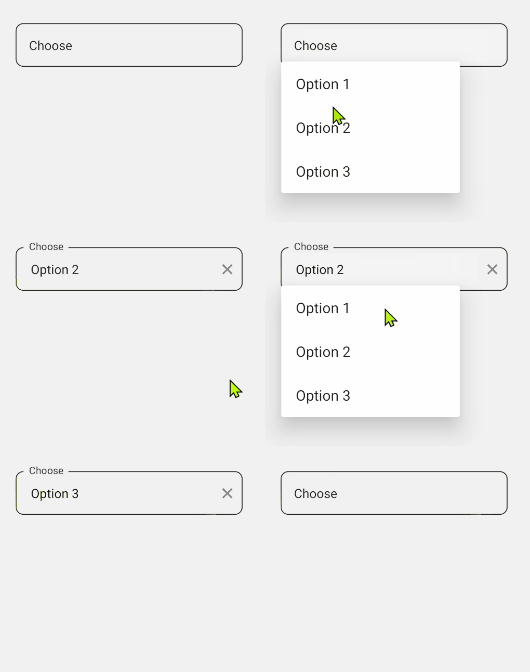 |
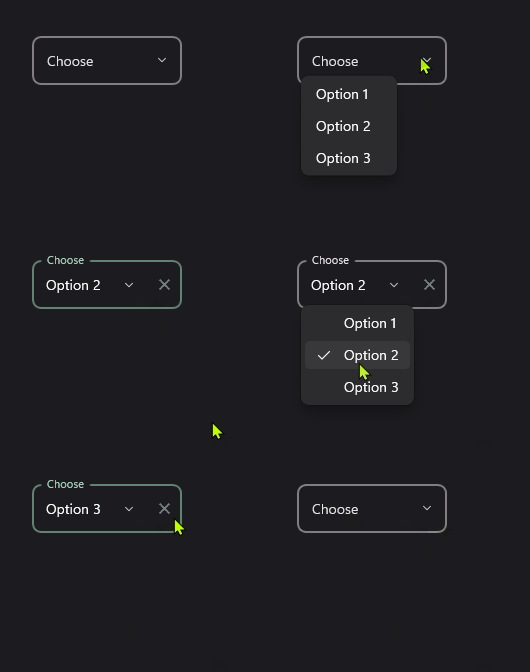 |
Icon
DropdownFields support setting an icon on the left side of the control. You can set the icon by setting the Icon property. The icon can be any ImageSource object. FontImageSource is recommended as Icon since its color can be changed when focused.
<material:DropdownField
    Title="Pick an option"
    ItemsSource="{Binding Items}"
    Icon="{FontImageSource FontFamily=MaterialRegular, Glyph={x:Static m:MaterialRegular.Expand_circle_down}}"
    />
Tip
You can use any ImageSource object as Icon. But FontImageSource is recommended as it can change its color when focused.
Refer to the Icons Documentation for more details on using icons.
AllowClear
DropdownFields support clearing the selected item by setting the AllowClear property to true. Default value is true. You can make it false to disable clearing.
<material:DropdownField
    Title="Pick an option (Clearable)"
    ItemsSource="{Binding Items}"
    AllowClear="True" />

<material:DropdownField
    Title="Pick an option (Unclearable)"
    ItemsSource="{Binding Items}"
    AllowClear="False" />
Validation
DropdownFields support validation rules. SelectedItem(object) will be used to validate the control. You can set the Validations proeprty to add validation rules. Default
<material:DropdownField
    Title="Pick an option"
    ItemsSource="{Binding Items}"
    Icon="{FontImageSource FontFamily=MaterialRegular, Glyph={x:Static m:MaterialRegular.Expand_circle_down}}">
    <material:DropdownField.Validations>
        <validation:RequiredValidation />
    </material:DropdownField.Validations>
</material:DropdownField>